How to Choose the Best Cold Wallet for Your Cryptocurrency
Cold Wallet Basics
A cold wallet keeps crypto keys offline and away from internet-connected devices. The crypto itself stays on the blockchain; the wallet just stores or uses the keys that authorize transactions. Cryptocurrency hard wallets are the most common form of cold wallet for individual users, while paper, metal, air-gapped computers, and institutional custody can also provide cold storage.
How offline signing works
- An online computer or phone prepares an unsigned transaction
- The transaction moves to the cold wallet
- The wallet signs it internally with the private key
- Only the signed transaction returns to the online device
- The signed transaction gets broadcast to the blockchain
The private key never needs to leave the hardware device. "Offline" mainly describes the isolation of the private key; some cold wallets can connect through USB, Bluetooth, NFC, or a mobile device to receive transaction data and broadcast signed transactions.
If you don't have your keys, you don't have your Bitcoin.
How to Pick a Cold Wallet in 2026
Cold vs Hot vs Warm
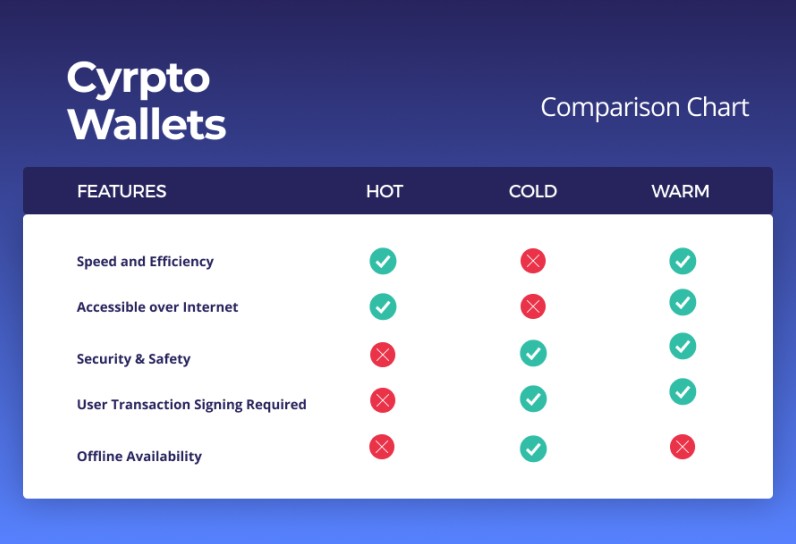
Cold wallets are for long-term holdings and larger balances. Hot wallets are more convenient for daily transactions, small balances, active trading, DeFi interactions, and liquidity needs. A common strategy is keeping long-term assets in cold storage while maintaining a limited operational balance in a hot wallet.
Wallet type comparison
- Hot wallet: Keys on internet-connected device. Daily transactions, small balances. Risks: phishing, malware, exchange failures
- Cold wallet: Keys isolated on hardware or offline backup. Long-term storage, larger balances. Risks: physical loss, supply-chain issues
- Warm wallet: Keys may stay online but need human approval. Active applications needing more convenience than cold
A crypto wallet does not contain fiat or crypto in the physical sense. It manages public and private keys. A public key or address works like an account number that receives assets. A private key authorizes outgoing transactions. A seed phrase is a human-readable representation of the private keys or the data needed to regenerate them. Cryptocurrency hardware wallets fall into the cold category when keys stay isolated offline.
Why Cold Storage Matters
The sources cite several figures showing the risk of leaving crypto in internet-connected environments. Approximately $2.2 billion in cryptocurrency was stolen through wallet-based attacks. The Bybit exchange reportedly lost $1.5 billion in one attack. One DeFi user lost $47,000 in seconds after clicking a phishing link.
Cold storage materially reduces exposure to remote phishing, malware, exchange compromise, and browser-based attacks. It does not protect against physical theft, compromised purchasing channels, counterfeit devices, social engineering, incorrect backups, or signing malicious transactions. No cold wallet provides absolute security.
Approximately 28% of American adults were described as owning cryptocurrency, with 67% planning to increase their holdings.
When to Move to Cold
The sources offer different amount-based thresholds. One beginner guide suggests considering a hardware wallet when holdings exceed $500. Another says a strong hot wallet may suffice below $100 and describes hardware as worthwhile once holdings exceed $500. A separate FAQ says most users with more than $1,000 to $5,000 may find a hardware wallet worthwhile. Other guidance defines the threshold as any amount the owner would regret losing.
These figures are not universal rules. The more consistent criteria are the expected size of holdings, the length of time they'll be held, the user's technical comfort, and the consequences of loss.
A cold wallet is especially relevant when
- Assets are intended to remain untouched for months or years
- The user wants direct control over private keys
- Exchange hacks, account freezes, or platform failures are a concern
- The user can maintain a secure offline backup without disclosing it
- The holdings are large enough that hardware cost is a reasonable proportion of protected value
Cobo's enterprise guide proposes holding approximately 80% to 95% of long-term holdings in cold storage and 5% to 20% in hot wallets. Suggested cold-storage uses include long-term investments, retirement assets, treasury reserves, stablecoins, and amounts above the user's risk tolerance. A cryptocurrency storage device makes sense when you're holding for the long haul and sleeping better knowing keys aren't online.
Security Features That Count
A Secure Element is a tamper-resistant chip used to generate or store private keys. It isolates key operations from the wallet's main processor and from the connected phone or computer. Many hardware wallets use chips evaluated under Common Criteria certifications such as EAL5+ or EAL6+. NGrave Zero is described as having EAL7 certification, the highest level cited.
A dedicated chip or Secure Element is not present in every device. Trezor Model T uses an open-source microcontroller rather than a dedicated Secure Element, while BitBox02, Coldcard, Cypherock X1, and several other products use dedicated secure hardware. Hardware cryptocurrency wallets with Secure Elements provide stronger key isolation than those without.
Authentication options
- PIN entry - common baseline
- Fingerprint authentication
- Optional device passkeys
- Passphrases and BIP39 hidden wallets
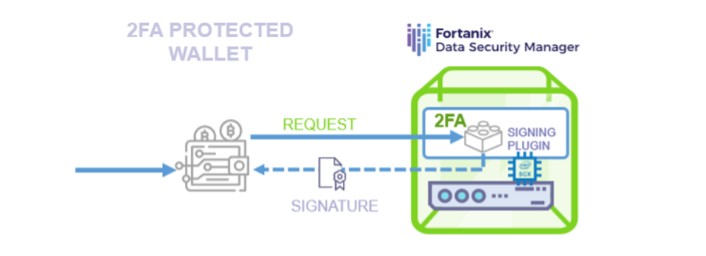
- Two-factor transaction approval
- Shamir shares or multi-card authorization
Certification provides third-party testing against specified attack classes, but it does not eliminate phishing, user error, malicious signing, or supply-chain risks.
The One Check Your Cold Wallet Needs
Top Hardware Wallets Compared
A ChangeHero shortlist names three brands as leading picks: Tangem for overall versatility, Ledger Nano X for beginners, and BCVault for "apocalypse-scenario" security. Its broader product labels identify Tangem for simplicity and portability, Trezor for user experience and privacy, Ledger for app compatibility, CoolWallet for mobile use, BCVault for long-term security, OneKey for open-source use, and Ellipal for air-gapped multi-coin support.
A D'CENT buyer's guide assigns category positions: D'CENT Biometric for biometric security, Trezor Safe 3 for open-source entry, Ledger Nano X for ecosystem all-rounder, Tangem for simplest setup, and Keystone 3 Pro for maximum air-gap security.
A D'CENT guide states that clear signing and pre-signature threat detection matter because many hardware wallets protect keys but do not warn users about the contents of a transaction. D'CENT's Blockaid integration is presented as an added layer that scans transaction requests before signature. A ledger crypto wallet like the Nano X supports staking, swapping, DeFi, and third-party integration options.
Hardware Wallet Profiles
Ledger was established in 2014 and states it has delivered more than 6 million devices worldwide. The product range includes Nano S Plus (lower-cost USB-only), Nano X (Bluetooth), Stax (larger touchscreen), and Flex. Prices start around $79 for Nano S Plus, $149 for Nano X, $279 for Stax, and $249 for Flex.
The Nano X is repeatedly described as beginner-friendly because of guided setup, companion app, and mobile connectivity. Ledger devices use an isolated proprietary Secure Element and require button or on-device input to reduce accidental signature risk. Ledger Live is the principal companion application, with integration for MetaMask, Coinbase Wallet, Binance Wallet, Exodus, and others. Ledger wallet hardware requires the official app for setup and firmware updates.
Trezor was established in 2013. Products include Trezor One, Model T, Safe 3, and Safe 5. Trezor Model T has a color touchscreen; Safe 5 adds haptic feedback. Trezor devices use physical button confirmation, PIN protection, and open-source firmware. Listed prices range from $49 for Model One to $219 for Model T.
The trezor v ledger debate comes down to open-source preference versus ecosystem integration. Trezor is generally described as fully open source, which allows developers and security researchers to inspect the code, verify update behavior, and identify vulnerabilities. Ledger offers more third-party app compatibility but closed-source firmware.
Trezor is generally described as fully open source, which allows developers and security researchers to inspect the code, verify update behavior, and identify vulnerabilities.
Tangem is a credit-card-shaped wallet using NFC with no battery, screen, or input device. It uses an EAL6+ Samsung Secure Element. Interaction is tapping the card to a phone; activation takes less than two or three minutes. Tangem uses a multi-card backup system, commonly two cards. The physical wallet is described as resistant to dust, water immersion, extreme temperatures, electromagnetic pulses, electrostatic discharge, and X-rays.
SafePal S1 is listed at approximately $49 with EAL5+ Secure Element, support for 10,000+ coins, air-gapped QR signing, and no Bluetooth. It is presented as a lower-cost hardware wallet for users who want to avoid wireless connections.
Keystone 3 Pro is assigned the maximum-air-gap category. Features include three Secure Elements, fingerprint authentication, 4-inch color touchscreen, QR-based air-gapped signing, no USB, Bluetooth, or Wi-Fi dependency, 5,500+ coins or tokens, iOS and Android apps, full open-source firmware, on-device transaction verification, and no device breach listed.
CoolWallet products use a credit-card form factor and Bluetooth. Two versions are named: CoolWallet S and CoolWallet Pro. The S is listed at approximately $99 and the Pro at $149, with combo offers and customization available. The devices require charging. The CoolWallet app operates as a hot software wallet with DeFi and Web3 features for Android and iOS.
BCVault is positioned as a high-security, USB-only device. The comparison matrix lists a price range of approximately $120 to $1,200, no dedicated Secure Element, FeRAM storage, 2.42-inch OLED, USB connection only, no charging, multisig, more than 20,000 tokens with full EVM-compatible-chain support, no open-source firmware, encrypted microSD backup, and support for as many as 2,000 independent wallets. The Original and One models differ primarily in shell material.
OneKey's lineup includes OneKey Pro, OneKey Classic, OneKey 1S, battery-free OneKey 1S Pure, OneKey Lite, and KeyTag backup products. OneKey Pro has a 3.5-inch color IPS touchscreen, camera for QR detection, NFC, on-device PIN entry, and fingerprint identification. The comparison lists a $79 to $278 price range, EAL6+ certification, model-dependent monochrome or color screens, Bluetooth on Classic models, multisig support, more than 30,000 supported assets, and full open-source firmware.
Ellipal devices use air-gapped QR-code communication rather than USB, Bluetooth, NFC, or a direct internet connection. The range includes the Titan 2.0 and the smaller Ellipal Mini. Listed prices include Mini from approximately $99 and Titan 2.0 from approximately $169. The feature matrix lists EAL5+ Secure Element, 2.7- to 4-inch color touchscreen, no Bluetooth, more than 10,000 supported assets, rechargeable 600 to 1,400 mAh batteries, non-open-source firmware, 12- or 24-word recovery, and maximum-air-gap category.
BitBox02 is available in Bitcoin-only and multicoin versions. The Safe Foundation page lists more than 1,500 assets for the multicoin version and Bitcoin-only support for the other model. It is priced at approximately £125. Features include compact body, OLED display, touch sensors, BitBoxApp, microSD backup, USB-C, and compatibility with macOS, Windows, Linux, and Android.
COLDCARD MK4 is a Bitcoin-only hardware wallet priced at approximately £185. Its listed features include a large screen, standalone operation without a phone or computer, Partially Signed Bitcoin Transactions, microSD backup, customizable PIN, BIP39 passphrase support, optional two-factor transaction authentication, delayed-transaction time lock, ATECC608A Secure Element, air-gapped operation, Tor support, and compatibility with Electrum and Wasabi.
Cypherock X1 supports more than 9,000 assets and is priced at approximately £99 to just under £200. Its security model uses Shamir Secret Sharing across four encrypted X1 cards. The device itself is a PIN-protected vault. A transaction requires confirmation from one card. The desktop software is open source and compatible with Linux, macOS, and Windows.
KeepKey is listed at approximately £50 and supports more than 7,000 assets, including Bitcoin and Ethereum. It has a wider-than-standard screen intended to show a full cryptocurrency address. Features include one physical button, PIN protection, periodic PIN changes, 12-word recovery phrase, required press-and-hold confirmation, USB connection, KeepKey desktop app, and compatibility with Linux, macOS, and Windows.
NGrave Zero is listed as supporting more than 4,000 assets. Prices cited are approximately £448 with the Graphene backup set and £358 without it. The device uses QR codes, a mobile app named Liquid, a touchscreen-style phone interface, PIN protection, optional fingerprint authentication, air-gapped signing, a 24-word recovery phrase, and a Graphene metal backup set. No private keys are preinstalled; keys are randomized during setup.
How to Pick Your Wallet
Secure Element and independent testing matter. EAL certifications range from EAL1 to EAL7, with most consumer wallets at EAL5+ or EAL6+. Transaction display and clear signing let users inspect recipient, amount, network, fee, and transaction data on trusted hardware. Clear signing decodes transaction data so the device shows what will be authorized instead of displaying only a hash.
Choosing a cold wallet - check these
- Secure Element quality and certification level
- Screen for transaction verification (or phone-dependent display)
- Authentication options (PIN, fingerprint, passphrase)
- Connectivity method (USB, Bluetooth, NFC, QR, air-gapped)
- Cryptocurrency and network compatibility
- Backup and recovery options
- Open-source firmware and independent audits
- Price relative to value being protected
One guide states that a higher price does not necessarily provide stronger security for a particular user. A $300 wallet may be proportionate for $10,000 or more in holdings, while a $60 device from a reputable manufacturer may provide meaningful protection for a smaller balance.
Compatibility should be checked at three levels: the specific coin or token, the blockchain or network, and the wallet's supported interface for displaying, signing, staking, or interacting. A wallet may support Bitcoin or Ethereum but not every ERC-20, BEP-20, TRC-20, NFT, or Layer 2 token. If you're looking for a where to buy ledger wallet , stick to the official website or authorized sellers to avoid counterfeit devices.
Tested Every Cold Wallet for 2026
Setup and Recovery
Hardware wallets should be purchased from the manufacturer or an authorized seller. Avoid used or pre-owned devices unless provenance and initialization state can be established. Counterfeit and tampered devices are risks; packaging may include tamper-evident seals, serialized labels, or holographic stickers. If a seal is broken, packaging appears resealed, or a device arrives preinitialized with a seed phrase, the manufacturer should be contacted before funds are loaded.
Before setup - package and firmware checks
- Inspect package for damage, broken seals, scratches, or resealing
- Confirm expected model
- Use manufacturer's authenticity-verification process if available
- Download companion app only from official website or app store
- Verify developer or publisher name
- Install current firmware through official process
During initialization, the device generates a new 12- or 24-word recovery phrase. Write words in exact order. A legitimate new hardware wallet should not arrive with a prewritten phrase or ask buyer to use words supplied by seller. Most devices ask user to confirm several words in correct order - skipping this removes a check against transcription errors. A hardware crypto wallet is only as secure as your backup and setup discipline.
Initialization steps
- Connect device to official companion app
- Create or import seed phrase
- Record phrase offline in exact order
- Set PIN or biometric
- Verify several words in correct order
- Test recovery on a small amount first
Physical and Digital Security
Cold-wallet devices can be stolen, lost, damaged by water, exposed to extreme temperatures, or destroyed by impact. A protective case, safe, or fireproof and waterproof storage location reduces risk. If a thief obtains a device but not the PIN, access controls, attempt limits, and wipe features may protect funds. Physical coercion remains possible - the security literature uses "$5 wrench attack" for threatening or physically compelling the owner to authorize a transaction or reveal information.
A cold wallet can be undermined before it reaches the owner. Risks include counterfeit hardware, preinitialized devices, compromised manufacturing, malicious firmware, tampered packaging, unofficial resellers, modified update mechanisms, and supply-chain interception. First defense is purchasing through official channel. Tamper-evident packaging, serialized labels, and authenticity-checking tools help identify interference.
Social engineering remains effective even when hardware is secure. Attackers may impersonate support, create fake applications, send phishing messages, or persuade a user to enter a seed phrase.
The hardware wallet should not be carried unnecessarily if a secure storage location is available. If transported discreetly, the case should not advertise the device or its contents. The seed backup should not be stored with the device. Some product pages claim water resistance, dust resistance, or anti-tamper destruction. Other guidance cautions that no device is indestructible. Water damage, heat, impact, and worn screens or buttons can all end a device's usable life even when the seed backup remains intact.
Advanced Strategies
Safe smart accounts add an advanced layer above individual hardware wallets. A Safe multisig setup can require signatures from multiple devices or wallets. A typical 2-of-3 configuration distributes signing authority across a Ledger, a Trezor, and a software wallet or another hardware signer. An attacker would need to compromise multiple keys rather than one device. The Safe material lists more than $100 billion in crypto assets secured by multisig wallets.
Advanced cold-storage approaches
- Multisig with Safe - distributes trust across multiple signers
- Geographic distribution - stores hardware and backups in separate locations
- Inheritance planning - documents wallet locations for trusted family
- Multiple cold wallets - separates holdings among devices or accounts
- Air-gapped computers - dedicated offline signing environment
Geographic distribution protects against localized fire, flooding, theft, or natural disaster. A home safe, bank safety-deposit box, and trusted person's secure location are cited as examples. Inheritance planning should not place seed phrase in an ordinary public will. The sources mention documenting wallet locations, leaving access instructions for trusted family members, using specialist crypto-estate attorneys, Shamir Secret Sharing, time-locked multisig accounts, and clearly separating operational wallet from inheritance wallet.
A user can separate holdings among devices or accounts. One home device might hold long-term assets, while a second handles a lower-risk category. This is analogous to dividing physical cash among secure locations. Multiple wallets can reduce single-device failure risk but do not protect a seed phrase copied in insecure locations.
A dedicated air-gapped computer can generate and store keys, run wallet software, and sign transactions without ever connecting to the internet. Only signed transaction data moves to an online machine for broadcast. This approach is described as an advanced-user or institutional option. It requires technical expertise, strict update procedures, and careful separation between the offline signing environment and the online broadcast environment.
Maintenance and Longevity
Hardware wallets are not set-and-forget devices. Recommended maintenance: store in cool dry place, keep away from direct sunlight and moisture, clean screens with soft dry cloth, avoid liquid cleaners, use protective sleeve, check manufacturer app for firmware updates monthly, install updates only through official app or website, verify update authenticity on device, test connectivity after major operating-system or browser updates, replace device if screen, buttons, secure-element area, or connectivity prevents reliable transaction verification, consider replacement if manufacturer stops issuing firmware or security updates.
Review schedule
- Monthly: review transactions, check Revoke.cash for unnecessary token approvals, inspect physical backup
- Every 3 months: review PIN and lock settings, confirm high-value account protection
- Every 6-12 months: review emergency recovery plan, check written recovery phrase legibility
A Ledger Nano X battery lasts approximately three to five years with regular use. Battery degradation may reduce wireless functionality or leave device usable only through USB. A broader FAQ says most hardware wallets can last five to ten years or longer, depending on use. Screens, buttons, ports, and batteries may wear out, but a functioning seed phrase allows restoration on a new device.
Risks and Reality
Cold wallets reduce certain risks but do not guarantee safety. The most common real-world losses result from signing malicious transactions, exposing recovery phrases, sending to fraudulent addresses, buying tampered devices, losing every seed backup, storing seed phrases digitally, installing malicious software, sharing info with scammers, or failing to verify contract and token approvals.
No legitimate support agent, website, or application will ask for a recovery phrase. A hardware-wallet company cannot generally recover funds when all seed backups are lost. A non-custodial wallet owner should maintain independent backups before storing significant balance. Cryptocurrency prices and digital-asset values can fluctuate sharply, and an investor can lose the entire amount invested.
Prices, supported assets, firmware, certifications, mobile compatibility, and threat-detection features can change. Published specifications differ across the supplied material, especially for Trezor, Tangem, CoolWallet, and other models with changing product lines. The source material spans different publication periods, and some images may be AI-generated. The sources are informational and do not replace financial, legal, or tax advice. Cryptocurrency investments carry significant risk, and users should conduct their own research before selecting a wallet or transferring funds.
The hardware-wallet market is described as growing at a 25.9% annual rate and projected to grow at a 25.9% CAGR through 2033. The figure appears as both a general annual growth statement and a forecast, so the underlying market definition and forecast period are important when interpreting it.
The hardware wallet ledger trezor debate comes down to open-source preference versus ecosystem integration. Trezor is generally described as fully open source, which allows developers and security researchers to inspect the code, verify update behavior, and identify vulnerabilities. Ledger offers more third-party app compatibility but closed-source firmware. Both have strong track records; the right pick depends on your specific needs, technical comfort, and how much you're protecting.

Comments on “How to Choose the Best Cold Wallet for Your Cryptocurrency”
No comments yet. Be the first to share your thoughts.