How to Use a Ledger Crypto Wallet Safely and Compare Alternatives
How to Use a Ledger Crypto Wallet Safely and Compare Alternatives
A ledger crypto wallet is really two products with one job: control your money without giving up the keys. My short version is simple. Ledger Wallet is the app that shows accounts, builds transactions, and offers swaps. A Ledger signer or hardware wallet holds the private keys and signs the deal.
Ledger Wallet was once called Ledger Live. The device names in Ledger’s setup material include the Ledger Stax, Flex, Nano Gen5, and Nano Classics. Assets named there include Bitcoin, Ethereum, Solana, Cardano, XRP, Monero, and USDT. Exact support can differ by model, so check any hardware crypto wallet against the coin and network you plan to use.
Hardware is only half the story. The app can be hit by malware, but the device is designed to keep private keys inside its secure chip and sign without handing them to the computer. That boundary is the point. It will not make a bad address or a bad swap good, but it gives you a real layer between your funds and a damaged computer.
Coin Bureau breaks down Ledger hardware wallet risks
Recovery Phrase and First Setup
On the first use of a Ledger Nano, you either import an existing seed or generate a new one on the device. Ledger devices use BIP39, which represents key material and a checksum as a 12- or 24-word mnemonic. People call this the recovery phrase or seed phrase, but it is more than a login code. Every key and address can grow from it.
First setup steps
- Decide whether you will import an existing seed or create a new one on the signer.
- Complete the seed step before you add accounts or receive funds.
- Record the 12 or 24 words in the exact order given by the device.
- Open Ledger Wallet and add only the assets supported by your exact model.
- Use separate accounts when you want to keep assets or purposes apart.
- Check the receive screen and account path before sending funds to an address.
- Keep the recovery phrase separate from synced app data and ordinary account exports.
All addresses and keys generated by the device are derived from that seed and organized as a tree of keys.
That tree matters because the app’s account list is not the seed. If you lose the phrase, a fresh install or new signer cannot rebuild the wallet from a screenshot of balances. The phrase must be retained if the wallet is to be restored.
Separate Accounts and Multiple Wallets
Ledger’s account guide says to create separate accounts for different assets so the ledger crypto wallet is easier to read. The word “account” can mean two things here. It can be an app label for Bitcoin or Ethereum, or it can be the numbered account level inside a BIP44 derivation path.
How separate accounts work
- Use separate accounts for different assets, networks, or clear purposes.
- The first Bitcoin account has an account value of 0, the second has 1, and the third has 2.
- An app account and a BIP44 account level are related ideas, but they are not always the same thing.
- On account-model assets, keep public accounts separate from accounts tied to your identity.
- Use separate wallet setups when you want to keep different physical devices or asset sets apart.
Ledger Sync does not sync or manage several Ledger hardware wallets. It syncs copies of the Ledger Wallet app across a phone, laptop, tablet, or other supported device. If your goal is to wall off one set of coins from another, do not lean on app sync as your wall.
The Nano S is the odd model out. A user can add accounts by hand, one at a time, but Ledger Sync does not support it. Ledger points to the model’s lack of capacity for demands such as the Cardano app and more advanced cryptographic work.
How Ledger Derives Addresses
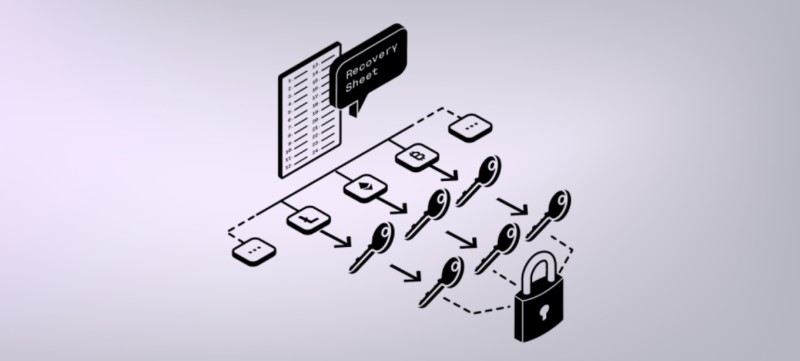
A crypto address maps to a script that sets the rules for spending its assets. Sending funds means creating a transaction that meets those rules and getting a signature from the signer. A hierarchical deterministic wallet, or HD wallet, lets one seed create a whole tree of key pairs. The BIP32 proposal appeared in the Bitcoin community around 2013.
The five parts of a Ledger BIP44 path
- purpose: This sets the address or script type. The cited values are 44 for legacy Bitcoin accounts, 49 for SegWit, 84 for native SegWit, and 86 for Taproot.
- coin_type: This names the cryptocurrency through SLIP44. Separate coin types can create separate key trees and reduce key reuse.
- account: This is the account number for that coin. Account 0 comes first, followed by 1, 2, and so on.
- change: A value of 0 marks a receiving address. A value of 1 marks a change address.
- address_index: This number counts addresses within the chosen account and change branch for UTXO assets.
An apostrophe in the path marks hardened derivation. You can see the path in Ledger Wallet through Account, Edit Account, Advanced, and then freshAddressPath. That field should match the address shown in the receive flow for the same account.
The path works with the seed to produce a public key. A crypto address is a different format for that public key. The tree also runs in one direction: a child key can be made from its parent, but the parent cannot be worked out from the child. That one-way rule lets one recovery phrase produce many addresses.
Fresh Receiving and Change Addresses
Ledger Wallet supports several UTXO coins, including Bitcoin, Bitcoin Cash, Bitcoin Cash Gold, Dash, Dogecoin, Litecoin, Peercoin, Qtum, Vertcoin, Zcash, and Decred. A UTXO is a discrete piece of crypto tied to an address. To make tracking harder, a Bitcoin account gives the sender a fresh receiving address for each incoming payment.
For the first Bitcoin Taproot account, the first three incoming payments can use paths m/86'/0'/0'/0/0, m/86'/0'/0'/0/1, and m/86'/0'/0'/0/2. Change can return through m/86'/0'/0'/1/0, m/86'/0'/0'/1/1, and m/86'/0'/0'/1/2. The fourth level changes because those are change addresses.
UTXO and account-model differences
- UTXO coins: A wallet can use a fresh address for each incoming payment and another fresh address for change.
- Account coins: Assets such as Ethereum, Solana, Cosmos, Polkadot, and Tron use one address for each account.
- Public history: A fresh UTXO address has less direct history, while one account-model address can show the account’s full transaction history.
- BIP44 ending: A UTXO path ends with 0 or 1 plus an address index. The usual account-model path ends with 0/0.
- Privacy: Fresh UTXO addresses make linking harder. Account-model users may need separate public and identity-linked accounts.
An xpub allows another party to track all past and future transactions for that account.
An xpub, or extended public key, gives access to the public keys and addresses below its node in the tree. Ledger Wallet uses each account’s xpub to derive its addresses. That is useful for the wallet, but it is also a privacy warning: Ledger asks users not to expose an account xpub.
Ledger users drained for $90 million - what happened
What Ledger Wallet Does
Ledger Wallet is the interface for managing crypto activity across supported blockchains. It can show a portfolio, prepare transactions, and connect to third-party services. The app does the talking; the signer remains the part that keeps keys inside hardware and approves the signature.
Ledger Wallet services
- Synchronize and recover account data.
- Buy and sell supported crypto through trusted partners.
- Swap tokens, including through cross-chain routes.
- Schedule recurring purchases.
- Stake on networks such as Ethereum and Cosmos.
- Use lending and borrowing through supported decentralized finance apps.
- View, transfer, and display NFTs on Ledger Flex and Ledger Stax.
- Track balances, transaction history, price alerts, and portfolio charts.
Ledger also describes a direct fiat route into a wallet. You can top up from a bank, convert to a stablecoin, and then buy, swap, or stake supported assets. The pitch is to remove the need to route every dollar through a centralized exchange first. The buy, sell, swap, and financial services still come from third parties, not from Ledger itself.
What LedgerJS passes to a signer
- LedgerJS gives apps high-level tools for talking with a Ledger device.
- For Ethereum, the source uses getAddress with the path 44'/60'/0'/0/0.
- For Bitcoin, getWalletXpub uses a path such as 84'/0'/0' to get the public keys for an account.
- The xpubVersion changes by asset and network. The source lists 0x0488b21e for Bitcoin mainnet and 0x043587cf for testnet.
- A UTXO address method can take a derivation mode, account number, and address index, then return the address used on the chosen network.
That code sits below the app, not inside your browser page. Developers use LedgerJS so they do not have to handle the signer’s low-level device communication themselves. It lets wallet apps ask for an address or signature while the private key stays on the hardware.
Ledger Sync and Account Data
Ledger Sync is an optional feature for sharing Ledger Wallet account data across app instances. The source says desktop and mobile copies can sync on a ten-second cycle. Balances, transaction history, and the account position can move across supported devices without exports, QR scans, or adding each account again.
What Ledger Sync does
- Shares account data between supported Ledger Wallet app instances.
- Backs up the app’s account data.
- Works without an email address or password for the sync service.
- Lets a new signer access the linked account data when that signer uses the same secret recovery phrase.
- Does not sync several physical Ledger hardware wallets.
- Does not replace the recovery phrase needed to restore the signer.
Ledger Sync uses the Ledger Key Ring Protocol to make encryption keys from the signer’s security. It encrypts account data before the data travels through public channels. The signer acts as the control point for the encryption, so the app instances can share data without handing the keys to each other.
Only the owner of the hardware wallet can encrypt the information, and Ledger itself cannot do so.
That is the line between app sync and signer control. Ledger wallet hardware protects the keys and signs. Sync protects the account data that the app wants to share. One does not take the place of the other.
Swaps, Providers, and Loss Risks
Ledger Wallet’s swap tab uses a marketplace model instead of sending every trade through one provider. The source names Uniswap, 1inch, OKX DEX, Near Intent, ThorChain, Velora, Exodus, and Changelly. More providers can mean better rates, more coin pairs, and another route when one provider has poor liquidity.
Swap providers named in the source
- Uniswap
- 1inch
- OKX DEX
- Near Intent
- ThorChain
- Velora
- Exodus
- Changelly
A self-custody swap does not have to ask an exchange for permission to begin, but that does not make every route trustless. Some routes use a centralized provider. Cross-chain swaps can add steps, some trades need more than one approval, and slippage can leave you with less value than the quote suggested.
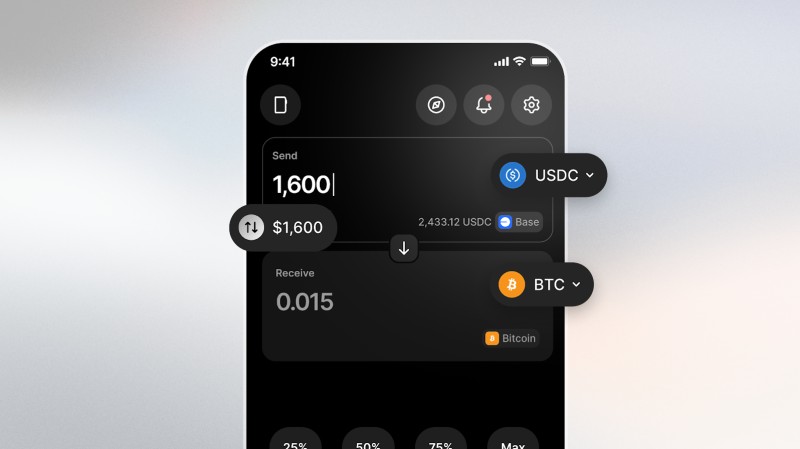
The swap form lets you enter dollars or euros instead of forcing you to think in tiny crypto units. It also supports gas sponsoring on selected pairs. For example, a user could swap USDC on Base without holding ETH on Base to pay that network’s fee, if the chosen route supports sponsored gas.
Swap is crypto’s purest expression of autonomy. Any asset, any time, 24/7, no permission needed.
The tab can warn you about high slippage or a loss of value, but it will not make the decision for you. That puts the hard part on you: read the route, check the numbers, and make sure the signer is approving what you think it is approving.
A swap check before signing
- Compare the coin and amount you send with the coin and amount you expect to receive.
- Read the slippage warning and ask why it is high.
- Check whether the route is centralized, decentralized, or cross-chain.
- Count the approvals so you do not approve a second step by surprise.
- Check whether you need the network’s gas token or whether the route sponsors it.
- Look at the provider terms and the transaction history shown by the app.
Provider lists and routes can change, so check what your app actually shows before you sign. Ledger says the crypto transaction services come from third-party providers and that it does not give financial advice or recommend those services. A swap warning gives you information. It does not guarantee a good trade.
Hardware implant confirmed in Ledger device from reseller
Hardware Security and Clear Signing
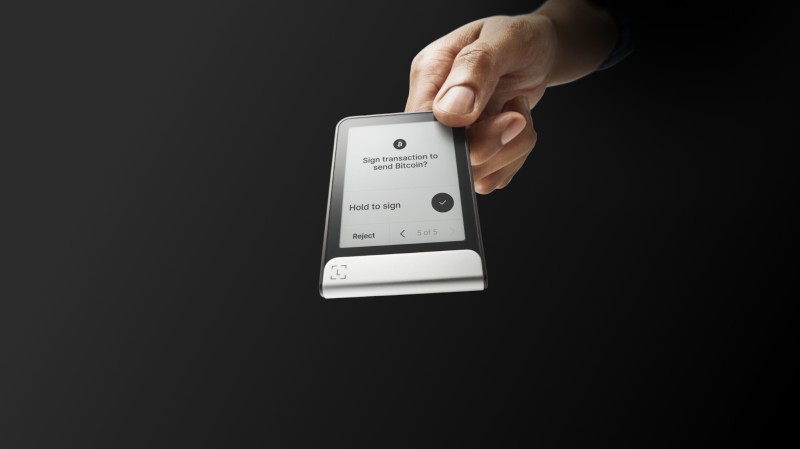
The hardware security model is built around a signing boundary. A Ledger device can talk to a computer through USB, create a transaction, and sign it without exposing the private key. Even if the surrounding app or computer is damaged, the device is designed to keep the key inside its secure hardware.
What the signer protects
- Private keys stay inside the device instead of being copied to the computer.
- The signer approves the transaction after the app prepares it.
- Clear signing shows the transaction details on the trusted device.
- Physical interaction keeps the final approval with the person holding the signer.
This is why calling the device a cryptocurrency storage device is only half the story. It also acts as a signing box. The screen and buttons give you a place to check the deal before the private key says yes.
Clear signing keeps private keys inside the hardware and prevents them from leaving the device.
That protection does not remove your responsibility. A hardware signer cannot know whether an address is a scam if you approve it without checking. It also cannot make a high-slippage swap fair. The device gives you a safer boundary, not a guarantee that every choice inside that boundary is good.
The Nano S Vulnerability From 2018
On March 20, 2018, Krebs on Security reported a Ledger Nano S vulnerability found by 15-year-old UK researcher Saleem Rashid. The issue involved physical access to or manipulation of a device before use. It was a real warning about the supply chain and the trust placed in each chip inside the signer.
What the reported attack targeted
- A secure processor protected sensitive device work.
- A less-secure microcontroller handled jobs such as USB communication and screen text.
- The two chips exchanged information, and the weaker chip could lie about what the device displayed or what its buttons meant.
- Malicious code installed before purchase could attack a new device, alter seed generation, or wait for later use.
The report said firmware version 1.3.1 did not authenticate the microcontroller strongly enough. Ledger released firmware 1.4.1 on March 6, 2018, before the Krebs report was published. The update tightened the checks, and updated Nano S devices could alert the user when connected to a computer.
You’re essentially trusting a non-secure chip not to change what is displayed on the screen or change what the buttons are saying.
A reader’s technical response challenged the broad claim that the flaw simply pulled an initialized seed from a used device. That reader described two other cases: planting a predictable seed on an uninitialized device, or adding a keylogger that could capture a PIN and approve later transactions while the compromised device ran with malicious software. That was a technical reading of the attack, not the only wording used in the original report.
Before you buy a Ledger wallet , use a seller you trust and apply the firmware updates made for the exact model. The 2018 case is not a reason to treat every signer as the same. It is a reason to check the model, the seller, and the security history instead of trusting a shiny box.
Ledger and Tangem Side by Side
The supplied comparison is not a full lab test. It says Ledger devices use batteries, USB ports, and screens that can wear down over time. It describes Tangem cards as having no battery and no screen. That is a real hardware difference, but it is not a complete security score.
Ledger and Tangem: what the source compares
- Physical design: Ledger devices in the comparison rely on batteries, USB ports, and screens. Tangem cards have neither a battery nor a screen.
- On-device details: A Ledger screen can show transaction information. The source does not explain how a screenless Tangem card presents every detail, so I would ask before assuming the two models work the same way.
- Key model: Ledger says its signer keeps private keys in hardware. Tangem says it provides hardware wallets and non-custodial software for managing digital assets.
- Transaction services: Both descriptions say third parties provide services such as buying, selling, and swapping.
- Main trade-off: A device with more built-in parts can wear or fail. A card with fewer parts may have a different trust and approval model. Neither fact settles the whole choice.
Tangem also says it does not hold, custody, or control user assets or transactions. That is a claim about its own setup, not proof that every card, app, or partner behaves well. I would read the recovery steps, signing steps, app permissions, and provider terms for whichever product I was considering.
Tangem states that it is not regulated as a financial-services provider or cryptocurrency exchange and does not hold, custody, or control user assets or transactions.
Ledger and Trezor are names shoppers often see under cryptocurrency hardware wallets . A search for Ledger and Trezor hardware wallets is a starting point, not a result. Compare the exact device, supported coins, signing display, backup rules, update path, and seller.
The label cryptocurrency hard wallets says little about safety by itself. The same is true for hardware cryptocurrency wallets . I would look at where keys live, whether the device shows what it signs, how the recovery phrase works, and what happens when software is attacked.
If you are searching for the best cold wallet for cryptocurrency , there is no safe shortcut through brand name alone. Check key isolation, model limits, privacy settings, account setup, and the source where the device comes from. A search for a cold wallet for Ripple adds another check: confirm that the wallet supports XRP on the exact network you need and shows the receiving address clearly.
My Ledger Crypto Wallet Setup Check
Before I call a ledger crypto wallet ready, I run through the same short list. It takes less time than recovering from a wrong address, a leaked phrase, or a swap that did not work as expected.
My pre-deposit check
- Pick the exact Ledger device model and check that it supports your coin and network.
- Decide whether you are importing an existing seed or generating a new one on the device.
- Record the recovery phrase in order and keep it separate from app data.
- Check whether your model supports Ledger Sync before you count on cross-device account recovery.
- Use separate accounts for different assets, networks, or purposes.
- Open the receive screen and confirm the address and freshAddressPath before receiving funds.
- Read every clear-signing request on the trusted device instead of approving from habit.
- For swaps, check slippage, route, approvals, gas, and the amount you expect to receive.
- Remember that buy, sell, and swap services come from third parties. Read their terms.
- Buy from a trusted seller and apply the firmware updates made for your exact device.


Comments on “How to Use a Ledger Crypto Wallet Safely and Compare Alternatives”
No comments yet. Be the first to share your thoughts.