Simple Steps to Create a Paper Wallet Private Key and Keep Your Crypto Safe
What Is a Paper Wallet Private Key
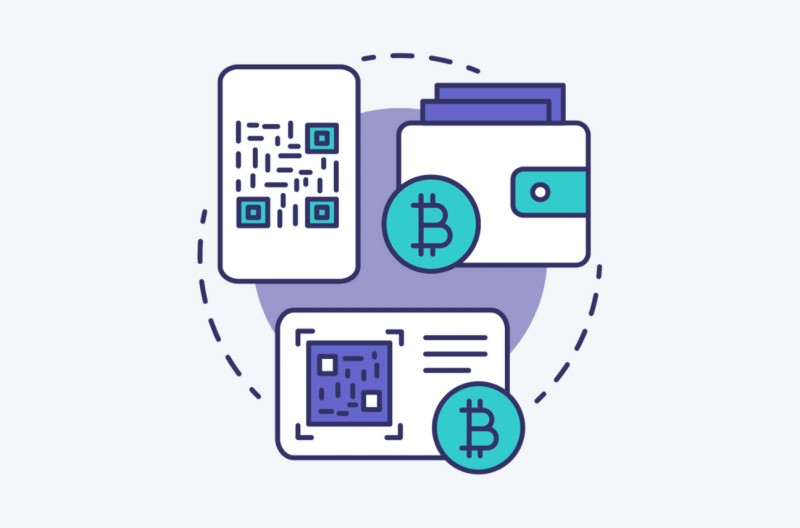
A paper wallet is just your public address and private key printed or written on paper. That's it. No chips, no batteries, no firmware updates. The public address receives crypto. The private key spends it. Anyone who gets that private key owns your funds - blockchain transactions don't have a cancel button. I've seen people lose everything because they posted a photo of their key online or saved it in cloud storage. Don't do that.
The crypto itself stays on the blockchain. The paper only holds the keys to control it. Think of the private key like the password to a bank account that nobody can reset. Lose it, and the money is gone forever unless you have another backup. QR codes help avoid typos when copying long strings, but scanning a private key QR code into a connected device pulls that key out of cold storage. Paper wallets are built for storage, not daily spending.
Why People Use Paper Wallets
Paper wallets are offline, non-custodial storage. You control the key - not an exchange, not a company. They cost almost nothing compared to a hardware wallet. No specialized device needed after creation. They can sit disconnected for years. They don't interact with smart contracts or apps while offline. You can share the receiving address without exposing the private key. You can make several copies and store them in different places.
But every benefit dies the moment that private key touches an internet-connected device. Malware on your computer during generation? Key compromised. Online generator that keeps a copy? Compromised. Printer with network access? Compromised. The key must be generated on trusted gear, from a trusted source, and stay offline the whole time. Some guides call this simple. Others call it a complex process requiring technical knowledge. Both can be true depending on how deep you go.
Main reasons to consider paper storage
- Private key never sits in an internet-connected app
- You hold the key - no third-party custodian
- Paper and ink cost pennies
- No hardware device to buy or maintain
- Stays offline for long-term holding
- Receive address can be shared safely
- Multiple offline copies in different locations
As a primarily long-term storage option without any spending action, there's a tendency to adopt an 'out of sight, out of mind' approach with paper wallets - so be extra certain they're hidden away from the sight of others. Just don't hide them so well that you end up unable to find them yourself.
Import Paper Wallet Private Key Into Electrum
Physical and Operational Risks
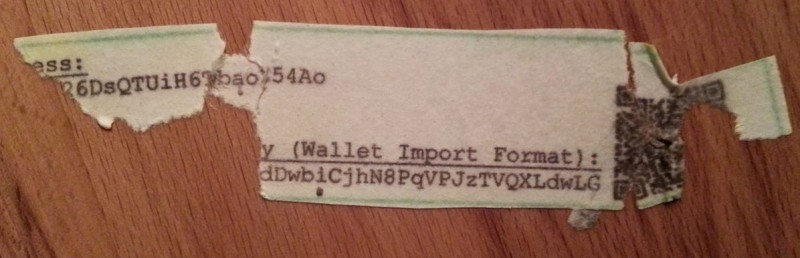
Paper burns. It tears. Water ruins it. Sunlight fades ink. Someone can steal it, photograph it, or find it during a search. If the only copy is destroyed and you have no backup, the funds are gone. I've seen a water-damaged paper wallet photo that made my stomach turn - the QR codes were unreadable, the text blurred.
The setup can fail before you even print. Malware captures the key while it's on screen. An online generator serves modified code. A compromised printer logs the output. Human error adds more risk: transcribing one character wrong, printing a faded key, scanning the wrong QR code, confusing the public address with the private key, funding the wrong address, losing generation files, hiding the wallet so well you can't find it. Each cryptocurrency needs its own paper wallet - a Bitcoin key won't control Ethereum or XRP assets.
Where Paper Wallets Fit in the Wallet Landscape
Hot wallets connect to the internet - mobile apps, browser extensions, desktop apps, web wallets, exchange accounts. Convenient for quick transactions, but exposed to malware, phishing, and compromised devices. Cold wallets keep keys offline. Hardware wallets sign transactions inside the device and only send the signature online. Paper wallets are the simplest cold storage - no power, no network, no OS after creation.
Custodial wallets mean a third party holds your key. Non-custodial means you hold the seed phrase or private key. "If you don't hold the seed phrase to your crypto assets, you don't ultimately own them." Paper and hardware wallets can be non-custodial after generation, but the service used to create them might still create custody risks if it retains the key. A paper wallet for crypto currency gives you full control, but you carry all the responsibility.
Wallet types compared
- Hot wallets - connected, convenient, higher risk
- Hardware wallets - offline keys, physical device, $50-$200+
- Paper wallets - offline keys, physical paper, nearly free
- Software wallets - desktop or mobile apps, free but exposed
- Web wallets - browser-based, some store keys on remote servers
- Brain wallets - seed phrase memorized, risky if memory fails
Preparing to Generate a Paper Wallet
First, pick the right blockchain. Separate wallets for Bitcoin, Litecoin, Dogecoin, Ethereum, Monero, XRP, Kin, and other unrelated chains. An Ethereum wallet handles ETH plus ERC-20 and ERC-1155 tokens. Tools mentioned in guides include WalletGenerator.net for Bitcoin/Litecoin/Dogecoin, MyEtherWallet for Ethereum, kinwalletcreator.com for Kin, bitaddress.org for Bitcoin, moneroaddress.org for Monero, bithomp.com for XRP, and bitcoinpaperwallet.com with its offline GitHub generator.
Your computer must be clean - no malware, no unauthorized software. Download the generator from its official or verified source. Verify downloaded files. Use a fresh OS that hasn't browsed the web. Better yet, use a laptop that has never touched the internet. Disconnect from every network before generating. Avoid online generators if an offline version exists. Keep keys out of cloud storage and public machines. Use a wired USB printer, not wireless. Never use a key shown in an article, screenshot, video, or demo - those are compromised by definition.
Pre-generation checklist
- Clean computer, no malware
- Generator from official/verified source
- Files verified before opening
- Fresh OS or never-online laptop
- Fully disconnected from networks
- Offline generator preferred over online
- No cloud storage for keys
- Wired USB printer only
- Never use publicly displayed keys
Creating a Paper Wallet with WalletGenerator.net
This walkthrough from a 2020 guide shows the process for Bitcoin, Litecoin, or Dogecoin. Load the generator page completely, then disconnect the internet. Or download the site from GitHub and run it offline - the offline route is more secure. Select your cryptocurrency, click "Generate New Address," move your mouse or type in the text field to add randomness until the generator says you have enough entropy. Green dots track mouse movement. Slow movements turn it into a drawing exercise while supplying entropy.
Open the "Paper Wallet" tab - this may generate a different key pair than the Single Wallet tab, which is expected. Review the public and private key info. Use the printable layout designed to obscure keys when held to light. Print via USB cable to a trusted printer prepared with paper and ink. Don't reconnect the internet to print. Verify the public address on a block explorer, send a tiny test amount, confirm arrival, then transfer the rest. For higher security, use a brand-new laptop that has never been online, or a fresh OS on an isolated machine.
The Paper Wallet tab may generate a different key pair from the Single Wallet tab. The guide explains that this is expected behavior and not a sign that the key was changed incorrectly.
Build an Encrypted Bitcoin Paper Wallet 2020
Creating an Ethereum Paper Wallet with MyEtherWallet

Download the offline version from GitHub, extract all files to the same folder, disconnect the internet, open the index HTML in a browser. A network connection warning is normal in offline mode. Click "Create Wallet," select "By Keystore File," create a strong password, download the keystore file. This file is a temporary bridge to access and print the paper wallet - not the long-term record itself. Access the wallet with the keystore file and password, click the printer icon under address details, print while offline, review the output, store securely.
The 2018 MyEtherWallet workflow differed - it kept the keystore file long-term and allowed saving the private key separately on a USB drive. The 2020 offline workflow says the keystore only needs to survive the first sign-in and print. Both warn against uploading keystore files to cloud storage. A paper wallet creation process varies by tool, but the offline-first principle stays the same.
Creating a Kin Paper Wallet
A 2020 Kin guide describes paper wallets as offline self-custody. Use kinwalletcreator.com to generate a public address and private key, write both on paper, store the private key where only you can access it, record the info twice, store copies in separate locations. The tool claims the private key never leaves your local machine. Alternatively, use Kin Laboratory: select Public Network, Generate Keypair, copy the keys, create a CreateAccount transaction to onboard the account on-chain, send a test amount, verify on the block explorer, then transfer the rest in multiple transactions if needed.
Accessing a Kin paper wallet later uses MyKinWallet, a non-custodial web interface. The guide warns that direct private-key access through MyKinWallet isn't the recommended method per its terms - you assume all risks. It also recommends a Ledger hardware wallet when available. This tension appears often: paper storage presented as a self-custody option while simultaneously steering you toward hardware.
Creating a Paper Wallet at a Bitcoin ATM
RockItCoin ATMs can generate and print a paper wallet during a purchase. Find a machine, select "create new wallet," let the ATM generate the key pair, print the wallet with QR codes, complete the purchase, store the paper securely. Available for Bitcoin, Litecoin, and Bitcoin Cash - not Ethereum. The printed wallet can be imported into the RockItCoin app. ATMs are in malls, convenience stores, gas stations. Transactions finish in minutes, not days like some exchanges. You control the wallet, not the exchange.
Same physical security rules apply - the ATM prints the key pair, you're responsible for the paper after it dispenses. Use reputable providers, verify transaction details, check the wallet address shown, keep the receipt, confirm the crypto arrived before any additional transfers. A new crypto account at an ATM gives you instant custody, but the paper protection burden is entirely yours.
Receiving and Verifying Funds
Share the public address or public-key QR code to receive. Never share the private key or its QR code. Verify carefully: record the address, compare character by character with the intended destination, check it on a block explorer, confirm it's on the right network, send a small test amount, wait for confirmation, verify receipt, then transfer the remainder. This applies to Bitcoin, Ethereum, Kin, and other networks with their respective explorers.
A small test only proves the public address can receive. It doesn't prove the private key is stored safely. The private-key record still needs verification, backup, and secure physical storage. Divide large sums into multiple transactions - crypto transactions can't be reversed.
Spending or Accessing Funds Later
Paper wallets are for long-term storage, not repeated transactions. When you need the funds, you can scan the private-key QR code into wallet software, enter the key manually, import it into a compatible wallet, sweep the full balance to another wallet, or use an interface that accepts a key pair. Scanning or entering the key into a connected wallet exposes it to malware, phishing, browser vulnerabilities, and server risks. The imported wallet becomes a hot wallet. Some workflows import only when ending the storage lifecycle - then destroy the original paper after sweeping and verifying the new wallet. Not risk-free: the key exists online during import, and the receiving wallet now owns the security burden.
For Kin, MyKinWallet warns direct private-key access isn't recommended. For Ethereum, MyEtherWallet can reopen via keystore file and password. For hardware storage, the private key stays in the device while a signed transaction goes to the network. A wallet address for crypto on paper is just the receiving side - spending requires the private key to leave the paper.
Printing and Physical Storage
Use a laser printer or pigment-based inkjet. Acid-free paper reduces fading and deterioration. High-quality prints keep characters and QR codes readable. Check every character after printing against the generated value - don't assume length or QR presence means it's right. Inspect each copy under normal light without unnecessary exposure.
Lamination protects against tears and moisture but risks melting laser toner. Test on a duplicate first. Ensure paper is fully dry. Don't position the private key where heat damages toner, print, or QR code. Store paper away from water, damp areas, fire, heaters, candles, direct sunlight. Dark, dry, stable environment. Away from kids and unauthorized visitors. Somewhere it won't be exposed by moving or unfolding it. A safe-deposit box, vault, or fireproof location works, but you must be able to retrieve it.
Physical protection basics
- Laser or pigment inkjet printer
- Acid-free paper
- Verify every character post-print
- Test lamination on a duplicate first
- Dark, dry, stable storage
- Fireproof/waterproof container
- Concealment that doesn't prevent retrieval
- Multiple copies in physically separate locations
The printable layout may include fields intended to obscure the key when the paper is held up to light. A wallet can also be folded against a dark background or concealed inside an opaque cover. Concealment should not make the record difficult to find.
Backup Strategies and Alternative Media
Print more than one copy. Record the key twice. Store copies in different physical locations. Keep one fire and water protected. Keep another in a separate secure spot. Confirm every copy is complete and readable. Test the recovery process before you need it. The 2018 MyEtherWallet workflow mentions an optional USB drive for another copy - that drive becomes a sensitive storage device and must be protected like the paper.
Cold storage isn't limited to paper. Steel sheets, engraved metal, bound books, acid-free paper, other durable non-networked media. Metal reduces fire, water, and fading risk. Whatever medium you use must preserve the key exactly and let you recover it without an online service. A steel backup can survive what paper can't.
Make, Gift, and Audit a Bitcoin Paper Wallet
Broader Wallet Security Controls
Strong passwords for exchange accounts, web wallets, desktop wallets, keystore files, encrypted backups - long, unique, hard to guess. Mix uppercase, lowercase, numbers, symbols. A password manager reduces reuse. Same password across services is a vulnerability. Strong passwords don't protect paper from physical theft, but they protect the software used to access a paper wallet.
Two-factor authentication adds a second step for exchange accounts, custodial wallets, web services. Authenticator codes, biometrics, codes to trusted devices. 2FA protects the login account, not the private key on paper. Paper custody remains physical.
Keep wallet software and OS updated for security patches. Download from trusted sources. Avoid suspicious links and phishing. Verify website addresses before entering private info. Skip public Wi-Fi for wallet activity. Current antivirus. Encryption on computers storing wallet files. Separate a dedicated wallet computer from daily browsing when practical. A compromised computer can alter the address shown on-screen or record a private key during generation. Hardware wallets reduce this by isolating signing, but you still verify transaction details on the device.
Device and software hygiene
- Update wallet software and OS regularly
- Download only from trusted sources
- Verify website addresses before entering keys
- Avoid public Wi-Fi for wallet operations
- Keep antivirus current
- Encrypt computers storing wallet files
- Consider a dedicated wallet computer
- Buy hardware wallets directly from manufacturers
Seed Phrases and Recovery Backups
Many modern wallets derive keys from a mnemonic seed phrase. A paper wallet may contain a private key directly, while other cold storage preserves a seed phrase that recreates the same keys. Keep multiple copies of the seed or key backup. Store copies in separate secure locations. Use offline or encrypted storage. Protect paper from physical damage. Record the wallet type, network, and creation date without writing the secret beside the key. Test recovery before an emergency. Cloud backups only with strong access controls and encryption.
Ledger and Trezor create a 24-word backup seed during setup. Some brain wallets use 12 words. Seed length depends on the wallet implementation - any supported phrase must be recorded exactly, including word order and spelling. A hardware wallet with seed backup gives you recovery options that a single paper private key doesn't.
Multi-Signature and Shared-Key Controls
Multi-signature requires more than one private key or signature to authorize a transaction. A 2-of-3 arrangement means three parties hold keys, any two can approve. This prevents one compromised key from moving all funds. It removes reliance on a single private key, distributes authority across people or devices, reduces impact of one lost or compromised key, requires approval from several parties, adds organizational control over high-value funds.
Combining a hardware wallet with multi-signature or social-recovery mitigates the single-key failure risk. Threshold signatures take this further - participants jointly create one signature indistinguishable from a normal transaction, revealing nothing about the signing structure on-chain. Greater privacy, constant transaction size, lower fees as participants grow, support for larger groups. The key is never reconstructed during signing - compromising fewer than the required devices leaves the key unavailable.
In a two-factor example, Alice creates the wallet through a computer and phone. She compares the public key displayed by both devices. Only after confirming that the keys match does she use the address. This lets her verify that a compromise of one device has not altered the wallet's public identity.
Historical Context and Hard Lessons
A 2018 overview listed 1,589 cryptocurrencies on CoinMarketCap at that time. Bitcoin led, with Litecoin, Ethereum, and Ripple taking different approaches. Coinbase was the popular exchange for buying Bitcoin, Ethereum, Litecoin, or Bitcoin Cash with debit card or bank transfer. Fractional units allowed - one satoshi is 0.00000001 BTC. The storage guidance was blunt: "Rule #1 of cryptocurrency is: Don't leave your coins on an exchange." Exchange hacks cited included Mt. Gox (850,000 bitcoins stolen in 2014), Blackwallet, Bitthumb, Coincheck. A web exchange controls users' private keys - compromise the exchange, compromise the funds.
That same overview recommended buying hardware wallets directly from Ledger or Trezor - not eBay or Amazon - because resellers can create supply-chain attacks. Its Bitcoin paper-wallet method: boot from a USB drive with Linux (Ubuntu), don't use the web generator, download the offline generator from the cantonbecker/bitcoinpaperwallet GitHub repo, disconnect from all networks, generate, print. The debate continued then over whether paper wallets are more secure than hardware wallets since the key must still be generated on a computer that could contain malware.
Two-Level Storage Strategy
A practical setup separates long-term custody from daily use: hardware wallet for the bulk of holdings, back up the seed phrase, limited hot or mobile wallet for transactions, transfer between cold and hot only when needed, verify destination address on the hardware device, confirm any website or dApp is legitimate before connecting, avoid keeping majority assets in software wallets, browsers, mobile devices, or exchange accounts. Memory-only storage (brain wallets) exists but human recall is fallible - forgetting the phrase permanently removes access.
Crypto products are unregulated, volatile, and subject to hacking, phishing, malware, exchange failure, physical theft, and user error. "Crypto products are unregulated and could be highly volatile. Please be aware of the risks before investing. To ensure that consumers who deal in crypto products are not misled, they are advised to DYOR (Do Your Own Research)." The 2018 overview also stated it's not financial advice and urged independent research before buying. A way to get a wallet for cryptocurrency that you control is the first step - everything after is on you.
Final Thoughts on Paper Wallets
Paper wallets work. They're cheap, offline, and give you full custody. But they demand discipline - clean generation environment, careful printing, redundant backups, physical protection, and a retrieval plan that doesn't rely on memory alone. The private key on that paper is the only thing standing between your funds and total loss. No customer support. No password reset. No second chance.
If you hold meaningful amounts long-term, a hardware wallet with seed backup and multi-signature support reduces the single-point-of-failure risk. Paper remains a valid option for those who understand the trade-offs and accept the responsibility. Just don't skip steps. Don't rush. And for the love of whatever you hold sacred - test with a small amount first.
blockchain wallets cryptocurrency wallet software phantom crypto



Comments on “Simple Steps to Create a Paper Wallet Private Key and Keep Your Crypto Safe”
No comments yet. Be the first to share your thoughts.